
FAQ
Frequently Asked Questions
You can subscribe to the higher plan for one month, run your tests, and then switch back to your initial plan the following month if needed.
The number of users is the maximum number of login/password pairs existing at any given time on the account (active or inactive). If you have reached the maximum number for your plan, you can delete a login/password pair and create a new one. A deleted course or user actually counts as -1.
Yes, you can import courses in SCORM 1.2 and SCORM 2004 format into SPOT LMS. The test results present in the SCORMS are reported in SPOT LMS as for tests built natively in SPOT LMS.
The Instructor is the one who creates the course. The Tutor(s) are the ones who answer learners' questions and grade learners' assignments.
Yes, we use STRIPE (https://stripe.com) services for card payments, for their quality, their security, and their seamless integration within SPOT.
The monthly plan can be cancelled at any time; you must log in every month to make your payment. The annual plan is significantly cheaper for the same duration and does not require you to log in to the payment interface every month. You can also change your plan (upgrade or downgrade) during the year.
Yes, the instructor who created the course can decide to allow or prohibit the downloading of elements by learners, he can also specifically prohibit the downloading of content within the course. The download ban requires a fee-based offer of a certain level.
Yes, but only for SPOT videos managed and hosted by SPOT; it is not possible for external videos like YouTube, ...
Your administrator has created an account for each user, with a different LOGIN and PASSWORD. Upon each account creation, the user automatically receives an email with their login details. Each user can then log in with this information using an up-to-date browser, allowing them to track the progress of their work.
No, SPOT LMS is a Cloud (SaaS) solution. The technical infrastructure is transparent to you, so you can focus on the pedagogical dimension. The technical management of the server, system and security updates, weekly backup,... are done by our system engineers. The cost of server management and server rental is included in the price of the offer.
Yes, the instructor has all the tools needed to create their course and make it available to their learners. Building a course is extremely simple and intuitive.
We do not provide our own content, with the exception of course templates that facilitate creation. Our platform is designed to integrate all types of content, from videos and PDF documents to quizzes and more.
You can integrate your logo as soon as you create your account. Each user will find it on every page he or she goes through. From the PRO offer, it is possible to customize the SPOT theme (colors). In the BUSINESS and PREMIUM offers, white label and personalized domain name are available, allowing you to change the login page, the logout page, etc. It is also possible in the PREMIUM offer to customize the dashboard thumbnails.
A videoconference is suitable for meetings with a small number of participants (maximum 10) as well as for Practical Works, learner follow-up,... while the virtual classroom is used to deliver a course to a large number of participants (up to 100 people) with one or more moderators to manage the class. A videoconference cannot be recorded, a virtual classroom can be recorded and its recording can be integrated into the body of a course.
Videoconferences allow you to organize meetings with a small number of participants (10 maximum) to carry out practical work, follow up with learners,... It is possible to easily share your screen to make a demonstration. No installation of tools, plugins,... is necessary. Videoconferences are limited to a certain number per month. The reset is made at the beginning of the calendar month. A dedicated and privatized server secures your information.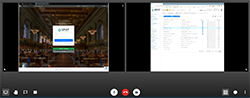
Videoconferences allow you to organize meetings with a small number of participants (10 maximum) to carry out practical work, follow up with learners,... It is possible to easily share your screen to make a demonstration. No installation of tools, plugins,... is necessary. Videoconferences are limited to a certain number per month. The reset is made at the beginning of the calendar month. A dedicated and privatized server secures your information.
A quiz is used to check comprehension during the course and is usually located in the middle of the course. The quiz validates the passage from one piece of content to another, depending on the validation conditions (having a score higher than X, having answered all the questions). It can of course be replayed as many times as the learner wishes. The quiz does not give a grade but a % score, 100% being the maximum possible score.
A test is used to measure the level of retention of the knowledge acquired; it is graded. It is usually located at the end of the course, or it can appear in several forms within a course dedicated to validating knowledge in order to deliver a certificate. It can never be replayed by a learner. The only possible validation condition is "writing a comment".
A test is used to measure the level of retention of the knowledge acquired; it is graded. It is usually located at the end of the course, or it can appear in several forms within a course dedicated to validating knowledge in order to deliver a certificate. It can never be replayed by a learner. The only possible validation condition is "writing a comment".